Mikrofrontend Nedir? Kapsamlı Rehber ve Uygulama Örnekleri
Mikrofrontend, büyük ölçekli frontend uygulamalarını yönetilebilir, bağımsız ve yeniden kullanılabilir parçalara ayırmanın modern bir yaklaşımıdır. Bu kapsamlı rehberde, mikrofrontend mimarisinin tüm detaylarını, faydalarını, zorluklarını ve pratik uygulama örneklerini inceleyeceğiz.
🚀 Mikrofrontend Nedir?
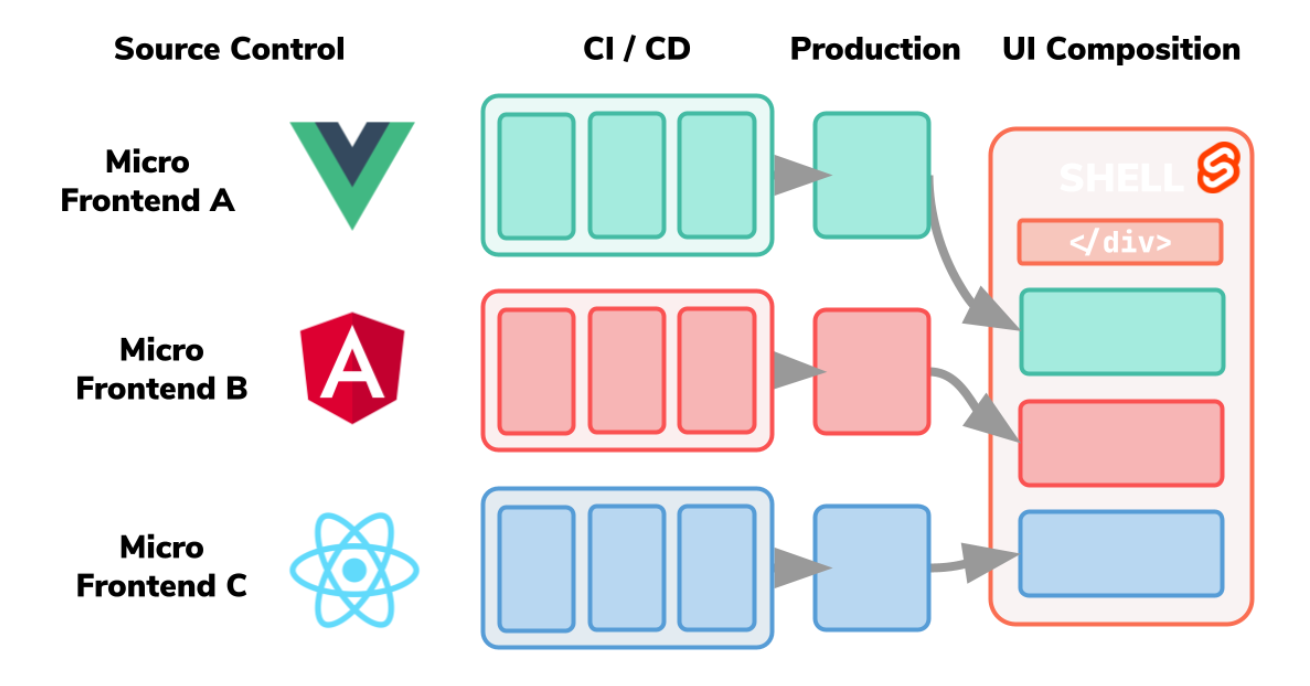
Mikrofrontend, mikroservis mimarisinin frontend dünyasına uyarlanmış halidir. Büyük, monolitik frontend uygulamalarını, her biri kendi sorumluluk alanına sahip küçük, bağımsız uygulamalara böler.
Mikrofrontend: Her mikrofrontend, tam bir uygulama gibi çalışabilir ve kendi teknoloji yığınına sahip olabilir. Bu, farklı ekiplerin farklı teknolojiler kullanmasına olanak tanır.
🏗️ Mikrofrontend Mimarisi
Mikrofrontend mimarisi, genellikle aşağıdaki bileşenlerden oluşur:
1. Host Application (Ana Uygulama)
// Host Application - Ana koordinatör
import React from 'react';
import { mount } from 'microfrontend-loader';

const App = () => {
  const [user, setUser] = useState(null);

  useEffect(() => {
    // Mikrofrontend'leri yükle
    const loadMicrofrontends = async () => {
      await mount('header-mf', document.getElementById('header'));
      await mount('sidebar-mf', document.getElementById('sidebar'));
      await mount('content-mf', document.getElementById('content'));
    };

    loadMicrofrontends();
  }, []);

  return (


  );
};

export default App;
2. Mikrofrontend Modülü
// Header Microfrontend
import React from 'react';
import { createRoot } from 'react-dom/client';
const Header = ({ user, onLogin, onLogout }) => {
return (
 {user ? (
) : (
)}
{user ? (
) : (
)}
);
};
// Mikrofrontend mount fonksiyonu
export const mount = (element, props) => {
const root = createRoot(element);
root.render(Bağımsızlık: Her mikrofrontend kendi state'ini yönetmeli ve diğer mikrofrontend'lerle minimum bağımlılığa sahip olmalıdır.
💡 Mikrofrontend'in Faydaları
1. Takım Bağımsızlığı
- Teknoloji Seçimi: Her takım kendi teknoloji yığınını seçebilir
- Geliştirme Hızı: Takımlar birbirini beklemeden geliştirme yapabilir
- Deployment Bağımsızlığı: Her mikrofrontend ayrı ayrı deploy edilebilir
2. Ölçeklenebilirlik
- Kod Tabanı Yönetimi: Küçük, yönetilebilir kod tabanları
- Performans: Sadece gerekli kısımlar yüklenir
- Bakım Kolaylığı: Her mikrofrontend ayrı ayrı bakım yapılabilir
3. Teknoloji Çeşitliliği
- React, Vue, Angular: Farklı mikrofrontend'lerde farklı framework'ler
- Legacy Sistem Entegrasyonu: Eski sistemler yavaş yavaş modernize edilebilir
- Risk Dağılımı: Teknoloji riski dağıtılır
⚠️ Mikrofrontend'in Zorlukları
1. Karmaşıklık
// Mikrofrontend'ler arası iletişim
class MicrofrontendCommunication {
  constructor() {
    this.eventBus = new EventTarget();
  }

  // Event gönderme
  emit(eventName, data) {
    const event = new CustomEvent(eventName, { detail: data });
    this.eventBus.dispatchEvent(event);
  }

  // Event dinleme
  on(eventName, callback) {
    this.eventBus.addEventListener(eventName, callback);
  }

  // Event dinlemeyi durdurma
  off(eventName, callback) {
    this.eventBus.removeEventListener(eventName, callback);
  }
}

// Kullanım örneği
const communication = new MicrofrontendCommunication();

// Header'dan giriş yapma eventi
communication.emit('user-login', { userId: 123, username: 'john' });

// Diğer mikrofrontend'lerde dinleme
communication.on('user-login', (event) => {
  console.log('Kullanıcı giriş yaptı:', event.detail);
});
2. Bundle Boyutu Yönetimi
// Webpack ile mikrofrontend konfigürasyonu
const ModuleFederationPlugin = require('@module-federation/webpack');

module.exports = {
  mode: 'development',
  plugins: [
    new ModuleFederationPlugin({
      name: 'header_mf',
      filename: 'remoteEntry.js',
      exposes: {
        './Header': './src/components/Header',
        './UserMenu': './src/components/UserMenu',
      },
      shared: {
        react: {
          singleton: true,
          requiredVersion: '^18.0.0',
        },
        'react-dom': {
          singleton: true,
          requiredVersion: '^18.0.0',
        },
      },
    }),
  ],
};
3. State Yönetimi
// Global state yönetimi
class GlobalStateManager {
  constructor() {
    this.state = {};
    this.subscribers = [];
  }

  setState(newState) {
    this.state = { ...this.state, ...newState };
    this.notifySubscribers();
  }

  getState() {
    return this.state;
  }

  subscribe(callback) {
    this.subscribers.push(callback);
    return () => {
      this.subscribers = this.subscribers.filter(sub => sub !== callback);
    };
  }

  notifySubscribers() {
    this.subscribers.forEach(callback => callback(this.state));
  }
}

// Singleton instance
export const globalState = new GlobalStateManager();
State Senkronizasyonu: Mikrofrontend'ler arası state senkronizasyonu karmaşık olabilir. Event-driven architecture kullanmayı düşünün.
🛠️ Mikrofrontend Implementasyon Yöntemleri
1. Module Federation (Webpack)
// Host application webpack config
const ModuleFederationPlugin = require('@module-federation/webpack');

module.exports = {
  plugins: [
    new ModuleFederationPlugin({
      name: 'host_app',
      remotes: {
        header_mf: 'header_mf@http://localhost:3001/remoteEntry.js',
        sidebar_mf: 'sidebar_mf@http://localhost:3002/remoteEntry.js',
        content_mf: 'content_mf@http://localhost:3003/remoteEntry.js',
      },
      shared: {
        react: { singleton: true },
        'react-dom': { singleton: true },
      },
    }),
  ],
};
2. Single-SPA
// Single-SPA konfigürasyonu
import { registerApplication, start } from 'single-spa';

// Header mikrofrontend'i kaydet
registerApplication({
  name: 'header-mf',
  app: () => System.import('http://localhost:3001/main.js'),
  activeWhen: ['/'],
});

// Sidebar mikrofrontend'i kaydet
registerApplication({
  name: 'sidebar-mf',
  app: () => System.import('http://localhost:3002/main.js'),
  activeWhen: ['/'],
});

// Content mikrofrontend'i kaydet
registerApplication({
  name: 'content-mf',
  app: () => System.import('http://localhost:3003/main.js'),
  activeWhen: ['/'],
});

// Single-SPA'yı başlat
start();
3. Iframe Yaklaşımı
// Iframe ile mikrofrontend entegrasyonu
class IframeMicrofrontend {
  constructor(containerId, src, options = {}) {
    this.container = document.getElementById(containerId);
    this.iframe = document.createElement('iframe');
    this.iframe.src = src;
    this.iframe.style.width = '100%';
    this.iframe.style.height = '100%';
    this.iframe.style.border = 'none';

    // PostMessage ile iletişim
    window.addEventListener('message', this.handleMessage.bind(this));

    this.container.appendChild(this.iframe);
  }

  handleMessage(event) {
    // Güvenlik kontrolü
    if (event.origin !== 'http://localhost:3001') return;

    const { type, data } = event.data;

    switch (type) {
      case 'user-login':
        this.emit('user-login', data);
        break;
      case 'navigate':
        this.emit('navigate', data);
        break;
    }
  }

  sendMessage(type, data) {
    this.iframe.contentWindow.postMessage({ type, data }, '*');
  }

  emit(eventName, data) {
    const event = new CustomEvent(eventName, { detail: data });
    window.dispatchEvent(event);
  }
}
📊 Mikrofrontend vs Monolith Karşılaştırması
| Özellik | Monolith | Mikrofrontend |
|---|---|---|
| Geliştirme Hızı | Başlangıçta hızlı | Takımlar bağımsız çalışabilir |
| Teknoloji Seçimi | Sınırlı | Esnek |
| Deployment | Tek seferde | Bağımsız |
| Karmaşıklık | Düşük | Yüksek |
| Performans | İyi | Optimize edilebilir |
Mikrofrontend kullanın: Büyük takımlarınız varsa, farklı teknolojiler kullanmak istiyorsanız ve uygulamanız sürekli büyüyorsa mikrofrontend mimarisi ideal olacaktır.
🔧 Pratik Uygulama Örneği
E-ticaret Uygulaması
// E-ticaret mikrofrontend mimarisi
const ecommerceMicrofrontends = {
  // Header - Kullanıcı girişi, sepet, arama
  header: {
    technology: 'React',
    port: 3001,
    responsibilities: ['user-auth', 'shopping-cart', 'search']
  },

  // Product Catalog - Ürün listesi, filtreleme
  catalog: {
    technology: 'Vue.js',
    port: 3002,
    responsibilities: ['product-list', 'filtering', 'pagination']
  },

  // Product Detail - Ürün detayı, yorumlar
  productDetail: {
    technology: 'React',
    port: 3003,
    responsibilities: ['product-info', 'reviews', 'recommendations']
  },

  // Checkout - Ödeme süreci
  checkout: {
    technology: 'Angular',
    port: 3004,
    responsibilities: ['payment', 'shipping', 'order-summary']
  },

  // User Dashboard - Kullanıcı paneli
  dashboard: {
    technology: 'React',
    port: 3005,
    responsibilities: ['order-history', 'profile', 'settings']
  }
};
Mikrofrontend Yükleme Sistemi
// Mikrofrontend yükleme sistemi
class MicrofrontendLoader {
  constructor() {
    this.loadedMfs = new Map();
    this.eventBus = new EventTarget();
  }

  async loadMicrofrontend(name, containerId, props = {}) {
    try {
      // Daha önce yüklenmiş mi kontrol et
      if (this.loadedMfs.has(name)) {
        return this.loadedMfs.get(name);
      }

      // Mikrofrontend'i dinamik olarak yükle
      const container = document.getElementById(containerId);
      const script = document.createElement('script');
      script.src = `http://localhost:3001/${name}/remoteEntry.js`;

      return new Promise((resolve, reject) => {
        script.onload = async () => {
          try {
            const module = await window[`${name}_mf`].get('./App');
            const app = module.default;

            // Mikrofrontend'i mount et
            app.mount(container, props);

            this.loadedMfs.set(name, app);
            resolve(app);
          } catch (error) {
            reject(error);
          }
        };

        script.onerror = reject;
        document.head.appendChild(script);
      });
    } catch (error) {
      console.error(`Mikrofrontend yüklenirken hata: ${name}`, error);
    }
  }

  async unloadMicrofrontend(name) {
    const app = this.loadedMfs.get(name);
    if (app && app.unmount) {
      app.unmount();
      this.loadedMfs.delete(name);
    }
  }

  // Mikrofrontend'ler arası iletişim
  emit(eventName, data) {
    const event = new CustomEvent(eventName, { detail: data });
    this.eventBus.dispatchEvent(event);
  }

  on(eventName, callback) {
    this.eventBus.addEventListener(eventName, callback);
  }
}

export const mfLoader = new MicrofrontendLoader();
🚀 Performans Optimizasyonu
1. Lazy Loading
// Lazy loading ile mikrofrontend yükleme
const LazyMicrofrontend = ({ name, containerId, ...props }) => {
  const [loaded, setLoaded] = useState(false);
  const [loading, setLoading] = useState(false);
  const [error, setError] = useState(null);

  useEffect(() => {
    const loadMF = async () => {
      setLoading(true);
      try {
        await mfLoader.loadMicrofrontend(name, containerId, props);
        setLoaded(true);
      } catch (err) {
        setError(err);
      } finally {
        setLoading(false);
      }
    };

    // Intersection Observer ile lazy loading
    const observer = new IntersectionObserver(
      (entries) => {
        if (entries[0].isIntersecting && !loaded && !loading) {
          loadMF();
        }
      },
      { threshold: 0.1 }
    );

    const container = document.getElementById(containerId);
    if (container) {
      observer.observe(container);
    }

    return () => observer.disconnect();
  }, [name, containerId, loaded, loading]);

  if (loading) return Yükleniyor...;
  if (error) return Hata: {error.message};
  if (!loaded) return ;

  return ;
};
2. Code Splitting
// Webpack code splitting konfigürasyonu
module.exports = {
  optimization: {
    splitChunks: {
      chunks: 'all',
      cacheGroups: {
        vendor: {
          test: /[\/]node_modules[\/]/,
          name: 'vendors',
          chunks: 'all',
        },
        common: {
          name: 'common',
          minChunks: 2,
          chunks: 'all',
          enforce: true,
        },
      },
    },
  },
};
🧪 Testing Stratejileri
1. Unit Testing
// Mikrofrontend unit test örneği
import { render, screen, fireEvent } from '@testing-library/react';
import Header from './Header';
describe('Header Microfrontend', () => {
const mockProps = {
user: null,
onLogin: jest.fn(),
onLogout: jest.fn(),
};
beforeEach(() => {
jest.clearAllMocks();
});
it('should render login button when user is not logged in', () => {
render(2. Integration Testing
// Mikrofrontend entegrasyon testi
import { mount } from 'cypress/react';

describe('Microfrontend Integration', () => {
  beforeEach(() => {
    // Test server'ını başlat
    cy.task('startMicrofrontends');
  });

  afterEach(() => {
    cy.task('stopMicrofrontends');
  });

  it('should load all microfrontends correctly', () => {
    cy.visit('/');

    // Header mikrofrontend'i kontrol et
    cy.get('[data-testid="header-mf"]').should('be.visible');
    cy.get('[data-testid="login-button"]').should('exist');

    // Sidebar mikrofrontend'i kontrol et
    cy.get('[data-testid="sidebar-mf"]').should('be.visible');
    cy.get('[data-testid="navigation-menu"]').should('exist');

    // Content mikrofrontend'i kontrol et
    cy.get('[data-testid="content-mf"]').should('be.visible');
    cy.get('[data-testid="main-content"]').should('exist');
  });

  it('should handle cross-microfrontend communication', () => {
    cy.visit('/');

    // Header'da giriş yap
    cy.get('[data-testid="login-button"]').click();
    cy.get('[data-testid="username-input"]').type('testuser');
    cy.get('[data-testid="password-input"]').type('password');
    cy.get('[data-testid="submit-login"]').click();

    // Sidebar'da kullanıcı menüsünün görünmesini kontrol et
    cy.get('[data-testid="user-menu"]').should('be.visible');
    cy.get('[data-testid="user-name"]').should('contain', 'testuser');
  });
});
📈 Monitoring ve Observability
1. Performance Monitoring
// Mikrofrontend performans izleme
class MicrofrontendMonitor {
  constructor() {
    this.metrics = new Map();
    this.observers = [];
  }

  // Mikrofrontend yükleme süresini ölç
  measureLoadTime(name, startTime) {
    const loadTime = performance.now() - startTime;
    this.metrics.set(`${name}_load_time`, loadTime);

    // Performance API'ye gönder
    performance.mark(`mf-${name}-loaded`);
    performance.measure(`mf-${name}-load-duration`, `mf-${name}-start`, `mf-${name}-loaded`);

    this.notifyObservers('load-time', { name, loadTime });
  }

  // Bundle boyutunu ölç
  measureBundleSize(name, size) {
    this.metrics.set(`${name}_bundle_size`, size);
    this.notifyObservers('bundle-size', { name, size });
  }

  // Hata oranını takip et
  trackError(name, error) {
    const errorKey = `${name}_errors`;
    const currentErrors = this.metrics.get(errorKey) || 0;
    this.metrics.set(errorKey, currentErrors + 1);

    this.notifyObservers('error', { name, error });
  }

  // Memory kullanımını izle
  measureMemoryUsage(name) {
    if (performance.memory) {
      const memoryUsage = {
        used: performance.memory.usedJSHeapSize,
        total: performance.memory.totalJSHeapSize,
        limit: performance.memory.jsHeapSizeLimit,
      };

      this.metrics.set(`${name}_memory`, memoryUsage);
      this.notifyObservers('memory', { name, memoryUsage });
    }
  }

  notifyObservers(event, data) {
    this.observers.forEach(observer => observer(event, data));
  }

  subscribe(callback) {
    this.observers.push(callback);
    return () => {
      this.observers = this.observers.filter(obs => obs !== callback);
    };
  }

  getMetrics() {
    return Object.fromEntries(this.metrics);
  }
}

export const mfMonitor = new MicrofrontendMonitor();
2. Error Tracking
// Mikrofrontend hata izleme
class MicrofrontendErrorTracker {
  constructor() {
    this.errors = new Map();
    this.setupGlobalErrorHandling();
  }

  setupGlobalErrorHandling() {
    // Global hata yakalama
    window.addEventListener('error', (event) => {
      this.trackError('global', {
        message: event.message,
        filename: event.filename,
        lineno: event.lineno,
        colno: event.colno,
        error: event.error,
      });
    });

    // Promise rejection yakalama
    window.addEventListener('unhandledrejection', (event) => {
      this.trackError('promise-rejection', {
        reason: event.reason,
        promise: event.promise,
      });
    });
  }

  trackError(microfrontend, error) {
    const timestamp = new Date().toISOString();
    const errorId = `${microfrontend}_${timestamp}_${Math.random()}`;

    const errorData = {
      id: errorId,
      microfrontend,
      timestamp,
      error,
      userAgent: navigator.userAgent,
      url: window.location.href,
      stack: error.error?.stack || error.stack,
    };

    // Hataları sakla
    const mfErrors = this.errors.get(microfrontend) || [];
    mfErrors.push(errorData);
    this.errors.set(microfrontend, mfErrors);

    // External error tracking service'e gönder
    this.sendToErrorService(errorData);
  }

  async sendToErrorService(errorData) {
    try {
      await fetch('/api/errors', {
        method: 'POST',
        headers: {
          'Content-Type': 'application/json',
        },
        body: JSON.stringify(errorData),
      });
    } catch (err) {
      console.error('Error tracking service unavailable:', err);
    }
  }

  getErrors(microfrontend) {
    return this.errors.get(microfrontend) || [];
  }

  getErrorRate(microfrontend, timeWindow = 60000) {
    const now = Date.now();
    const errors = this.getErrors(microfrontend);
    const recentErrors = errors.filter(
      error => now - new Date(error.timestamp).getTime() < timeWindow
    );

    return recentErrors.length;
  }
}

export const errorTracker = new MicrofrontendErrorTracker();
🔒 Güvenlik Konuları
1. Content Security Policy
2. Subresource Integrity
// SRI ile güvenli mikrofrontend yükleme
async function loadMicrofrontendWithSRI(url, integrity) {
  const script = document.createElement('script');
  script.src = url;
  script.integrity = integrity;
  script.crossOrigin = 'anonymous';

  return new Promise((resolve, reject) => {
    script.onload = resolve;
    script.onerror = reject;
    document.head.appendChild(script);
  });
}

// Kullanım
const mfIntegrity = 'sha384-oqVuAfXRKap7fdgcCY5uykM6+R9GqQ8K/uxy9rx7HNQlGYl1kPzQho1wx4JwY8wC';
await loadMicrofrontendWithSRI(
  'https://cdn.example.com/header-mf.js',
  mfIntegrity
);
📚 Önerilen Kütüphaneler ve Araçlar

Framework'ler
- Single-SPA: Mikrofrontend orchestration
- Module Federation: Webpack tabanlı çözüm
- Piral: .NET tabanlı mikrofrontend framework'ü
- FrintJS: JavaScript mikrofrontend framework'ü
Routing
- Single-SPA Router: Mikrofrontend routing
- SystemJS: Dynamic module loading
- Import Maps: Module resolution
State Management
- Redux: Global state management
- Zustand: Lightweight state management
- Event Bus: Mikrofrontend'ler arası iletişim
Testing
- Playwright: E2E testing
- Storybook: Component testing
- Jest: Unit testing
🚀 Gelecek Trendleri
1. Edge Computing
Mikrofrontend'lerin edge server'larda çalıştırılması, daha hızlı yükleme süreleri sağlayacak.
2. AI-Powered Optimization
Yapay zeka ile otomatik bundle optimizasyonu ve performans iyileştirmeleri.
3. WebAssembly Integration
WebAssembly ile daha performanslı mikrofrontend'ler geliştirme.
Mikrofrontend geleceği: Edge computing, AI optimizasyonları ve WebAssembly entegrasyonu ile daha da güçlü hale gelecek. Bu trendleri takip edin!
📝 Sonuç
Mikrofrontend mimarisi, büyük ölçekli frontend uygulamaları için güçlü bir çözümdür. Takım bağımsızlığı, teknoloji çeşitliliği ve ölçeklenebilirlik gibi faydalar sağlarken, karmaşıklık ve koordinasyon gibi zorluklar da getirir.
Mikrofrontend kullanmaya karar verirken, projenizin büyüklüğünü, takım yapınızı ve teknik gereksinimlerinizi dikkate alın. Doğru implementasyon ile mikrofrontend mimarisi, modern web uygulamaları için mükemmel bir çözüm olabilir.
Önemli Noktalar:
- Takım bağımsızlığını sağlar
- Teknoloji çeşitliliğine olanak tanır
- Ölçeklenebilir ve sürdürülebilir
- Doğru implementasyon gerektirir
- Monitoring ve testing önemlidir